The path an event takes
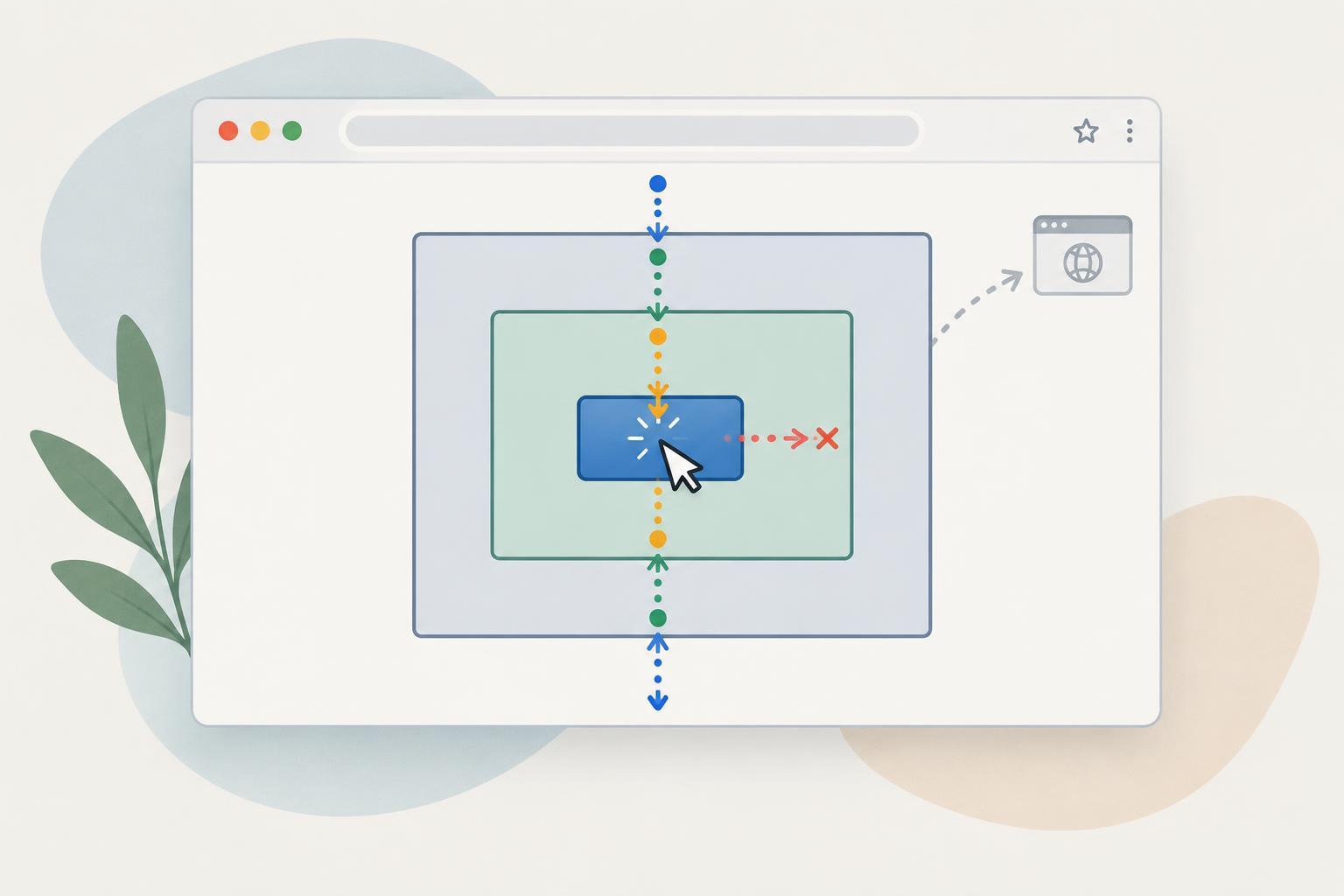
When you click a button inside a container, the browser does more than notify the button. It dispatches an event along a path through the DOM. The event travels from ancestors toward the target during the capturing phase, reaches the target, and then travels back through ancestors during the bubbling phase. Most listeners registered with addEventListener use the bubbling phase unless you explicitly request capture.
A listener's event.target identifies the element where the event originated. Its event.currentTarget identifies the element whose listener is currently running. If a button is inside a container and the container handles the button's click, target is the button and currentTarget is the container. This distinction makes it possible for one parent listener to handle interactions with several children, a pattern called event delegation.
See capturing and bubbling in the console
Try this on an empty about:blank page in a modern browser's developer console. First create a container and button: const box = document.createElement('div'); const button = document.createElement('button'); button.textContent = 'Click me'; box.append(button); document.body.append(box); Each statement can be entered separately or pasted together. This example uses only standard browser DOM APIs and does not need a library.
Next, register three listeners: box.addEventListener('click', () => console.log('box capture'), { capture: true }); button.addEventListener('click', () => console.log('button')); box.addEventListener('click', () => console.log('box bubble')); Click the button. You should see “box capture,” then “button,” then “box bubble.” The container's capturing listener runs on the way in; its bubbling listener runs on the way out.
The example does not imply that every event bubbles. Event types differ, and listeners can also change what happens along the path. When debugging, check the particular event you are using rather than assuming that an ancestor listener will always run. You can inspect event.bubbles in a listener to find out whether that event is configured to bubble.
preventDefault changes behavior, not the path
Some events have a browser action associated with them. Clicking a link can navigate; submitting a form can initiate a submission. Calling event.preventDefault() asks the browser not to perform that action. It does not, by itself, stop other listeners from receiving the event.
For a small test on the same about:blank page, run: const link = document.createElement('a'); link.href = '#example'; link.textContent = 'Try the link'; document.body.append(link); link.addEventListener('click', event => { event.preventDefault(); console.log('link handled'); }); document.body.addEventListener('click', () => console.log('body received click')); Click the link. Both messages appear, but the click does not change the URL fragment. This shows that preventing the default action and allowing propagation are compatible.
Use preventDefault only when you intend to replace a browser behavior with a workable alternative. For example, cancelling form submission makes sense if your code validates and then handles the form appropriately. The method has an effect only when the event is cancelable; event.cancelable reports that property. A passive listener cannot cancel an event's default action.
stopPropagation changes who receives the event
Calling event.stopPropagation() prevents the event from continuing to other nodes along its propagation path. For example, a button inside a clickable card might handle its own action without also triggering the card's click listener. Unlike preventDefault, stopPropagation does not cancel a link's navigation or another default action.
To see the difference, use a fresh button and container or reload about:blank before recreating the first example. Change the button listener to: button.addEventListener('click', event => { event.stopPropagation(); console.log('button'); }); The container's capture listener still runs before the event reaches the button, but its bubble listener does not run afterward. A capture listener on an ancestor can likewise stop the event before it reaches the target.
stopPropagation does not prevent other listeners on the same node from running. If you specifically need to stop those as well, stopImmediatePropagation() does that for listeners that have not yet run. Use either method sparingly: stopping events deep inside a component can surprise parent components that rely on delegation. Often the clearer solution is for the parent to check event.target and decide whether that interaction belongs to it.
Choose the tool that matches the problem
If a browser action should not occur, consider preventDefault. If an event should not reach additional nodes, consider stopPropagation. If you only want a parent listener to ignore certain targets, check the target instead of interrupting propagation. These choices solve different problems, even though they are often discussed together.
When behavior seems inconsistent, trace it in order: identify the target, note whether a listener uses capture, inspect currentTarget in each listener, and check whether the event bubbles and is cancelable. Small console experiments like the ones above make that path visible before it becomes buried in a larger interface.